Shared Memory
DAO is based on independent processes interacting via shared memory.
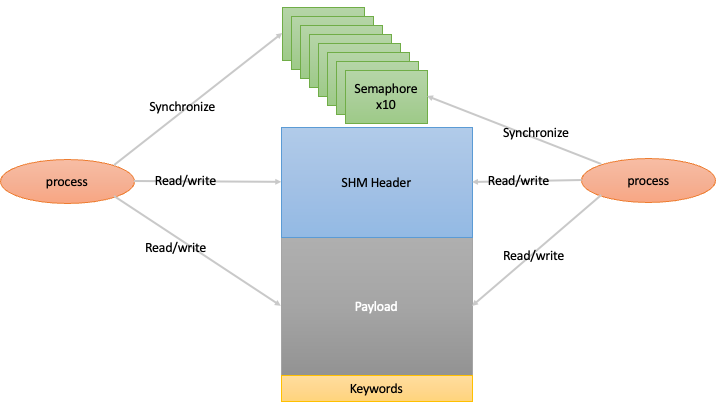
This shared memory provides a low latency, high performance data interface and synchronization mechanism.
Overview
The Durham AO (DAO) system uses a shared memory architecture for efficient data exchange between processes. The shared memory interface is designed to:
Allow low-latency data transfer between processes
Support multiple platforms (Linux, macOS, Windows)
Provide synchronization mechanisms via semaphores
Handle various data types for scientific computing
Core Components
The shared memory system consists of several key components:
IMAGE structure: The main container that holds metadata and points to the shared data array
IMAGE_METADATA: Contains information about the image dimensions, data type, timestamps, and counters
Semaphores: Used for inter-process synchronization when data is updated
Cross-platform layer: Abstracts system-specific implementations (POSIX vs Windows)
Supported Data Types
The system supports the following data types:
Integer types (8, 16, 32 and 64-bit, signed and unsigned)
Floating point types (single and double precision)
Complex numbers (single and double precision)
Synchronization Methods
The system provides two synchronization methods:
Semaphores: Using the daoShmWaitForSemaphore function
# Wait for update using semaphore 0
data = shared_mem.get_data(check=True, semNb=0)
By default, the shared memory is created with 10 separate semaphores for use by separate processes.
Polling on Counter: Using the daoShmWaitForCounter function
# Wait for update using counter (spin)
data = shared_mem.get_data(check=True, spin=True)
Cross-Platform Implementation
The shared memory implementation varies by platform:
Linux/macOS: Uses POSIX shared memory (mmap) and POSIX semaphores
Windows: Uses Windows file mapping objects, file handles, and system semaphores
Metadata and Counters
Each shared memory segment maintains several important counters:
cnt0: Incremented each time the image is updated
cnt1: In 3D rolling buffer images, indicates the last slice written
cnt2: In event mode, records the number of events
Flags controlling or indicating the state of the shared memory are provided: * write: 1 if the SHM is currently being written, and 0 otherwise. Useful for verifying the integrity of data copied from SHM
Timestamps are also recorded:
creation_time: When the shared memory was created
last_access: Last time the shared memory was accessed
atime: Acquisition time with nanosecond precision
Accessing timestamp data:
# Get timestamp from shared memory
timestamp = shared_mem.get_timestamp()
Memory Layout
The shared memory segment consists of:
The IMAGE_METADATA structure at the beginning
The actual data array
Optional keywords (for storing additional metadata)
Semaphores for synchronization
FIFO (Circular Buffer) Mode
Warning
FIFO mode is experimental and is not enabled by default. A standard shared memory segment has a FIFO depth of 1 (single-frame behaviour). When a depth greater than 1 is requested, the new FIFO-specific API must be used — mixing legacy direct array access with a depth-N segment will produce undefined behaviour.
The DAO shared memory system supports an optional FIFO (circular buffer) mode that retains the last N frames inside a single shared memory object. This is useful when the reader may occasionally stall, or when historical frames need to be inspected.
See FIFO Shared Memory for a complete description of the FIFO API, memory layout, and usage examples.
ZeroMQ Integration
The shared memory system can optionally integrate with ZeroMQ for network communication:
# Configure shared memory with publishing
shared_mem = shm("/tmp/example.im.shm", data, pubPort=5555)

# Enable publishing
shared_mem.pubEnable = True
shared_mem.pubThread.start()

# On another machine, subscribe
remote_shm = shm(subPort=5555, subHost='hostname')
remote_shm.subEnable = True
remote_shm.subThread.start()
C++ Interface
For C++ developers, including the daoShm.hpp header provides access
to the following shared memory interface:
// Create a shared memory segment (depth=1 by default; use depth>1 for FIFO mode).
Dao::Shm(const std::string &name, const Dao::Shape &shape, T *frame = nullptr,
         uint32_t depth = 1);

// Open an existing shared memory segment.
Dao::Shm(const std::string &name);

// Write frame to shared memory.
Dao::Shm::set_frame(const T *frame);

// Get the newest frame (with optional synchronization).
T* Dao::Shm::get_frame(Dao::ShmSync sync);
T* Dao::Shm::get_frame();

// FIFO-mode reading (see fifo.rst for full details).
T* Dao::Shm::get_next_frame(bool wait, int_fast8_t &status);
T* Dao::Shm::get_next_frame(bool wait, int_fast8_t &status, uint64_t &cnt0);
T* Dao::Shm::get_arbitrary_frame(uint32_t segment_idx);
int_fast8_t Dao::Shm::check_segment_overwrite();
Information on the full C++ interface can be found in the Doxygen documentation.
C Interface
Both the C++ and Python interfaces are lightweight wrappers around the C library functions. For C developers, the following key functions are available:
// Create a standard (depth-1) shared memory segment
int_fast8_t daoShmImageCreate(IMAGE *image, const char *name, long naxis, uint32_t *size,
                             uint8_t atype, int shared, int NBkw);

// Create a FIFO shared memory segment with depth N (experimental)
int_fast8_t daoShmImageCreate_FIFO(IMAGE *image, const char *name, long naxis, uint32_t *size,
                                   uint8_t atype, int shared, int NBkw, uint32_t fifo_size);

// Access an existing shared memory segment
int_fast8_t daoShmShm2Img(const char *name, IMAGE *image);

// Write data to shared memory (advances the FIFO automatically)
int_fast8_t daoShmImage2Shm(void *im, uint32_t nbVal, IMAGE *image);

// Wait for updates
int_fast8_t daoShmWaitForSemaphore(IMAGE *image, int32_t semNb);
int_fast8_t daoShmWaitForCounter(IMAGE *image);

// FIFO reading (experimental – see fifo.rst for full details)
int_fast8_t daoShmGetNewestSegment(IMAGE *image, void **ptr, uint32_t *idx, uint64_t *cnt0);
int_fast8_t daoShmGetNextSegment(IMAGE *image, void **ptr, uint32_t *idx, uint64_t *cnt0);
int_fast8_t daoShmWaitForNextSegment(IMAGE *image);
int_fast8_t daoShmGetArbitrarySegment(IMAGE *image, void **ptr, uint_fast32_t fifo_idx);
int_fast8_t daoShmCheckSegmentOverwrite(IMAGE *image);
int_fast8_t daoShmResetTail(IMAGE *image, uint32_t *idx, uint64_t *cnt0);

// Clean up
int_fast8_t daoShmCloseShm(IMAGE *image);
Additionally, the C interface provides partial write functions, which can be useful when working with packetised data over a network (e.g. receiving frames from GigE Vision cameras). Information on the complete C interface can be found in the Doxygen documentation.